
REPORTS > VISITS > ENCOUNTERS
12.05.2026
Reports, Support Posts
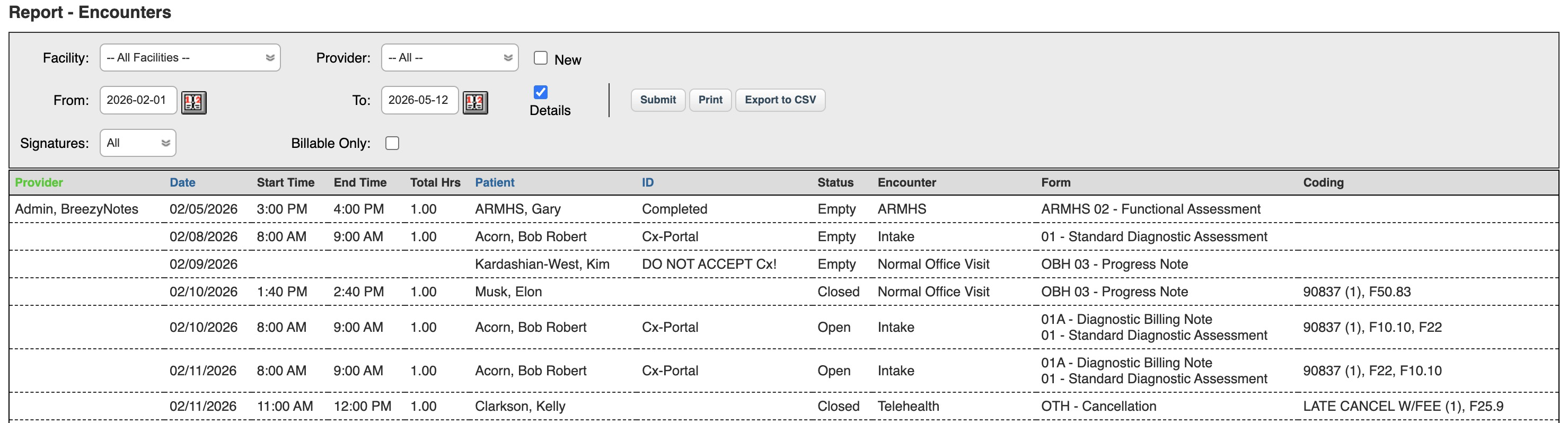
The Encounters Report is a powerful way to see which Encounters are ready for billing or get a status on billed/unbilled Encounters and employee time on them.
Settings/Options for the Encounters Report.
- Facility: Shows Encounters associated with specific Service Facilities
- Provider: Shows Encounters associated with specific rendering providers.
- New: Shows New Encounters only.
- From Date and To Date: Filter by Encounter Date.
- Details: Include all Encounter details available. Without checking this you will get only a count of the Encounters matching your other filters/settings.
- Signatures:
- All – Shows all Encounters
- Signed – Shows all Encounters with at least one signed form on them
- Unsigned – Shows all Encounters with no signed form
- Billable Only – Shows all Encounters that has “billable” forms (i.e. forms that are set up with billing codes in them).